
Food Online turns your WooCommerce store into a restaurant ordering system. Your whole menu on one page, delivery, pickup or eat-in chosen up front, a time slot at checkout, and the order lands in WooCommerce like any other.
It runs on your own site, so there is no commission per order and the customer list is yours. Start with the free version if you want to kick the tyres first. Screenshots, demos and every feature are on foodonlineplugin.com.
Made for the phone in your guest’s hand
Most food orders are placed on a phone, so Food Online is built for the small screen first. The categories stay in reach at the top, the search finds a dish while you type, and a slim total bar at the bottom follows the guest down the menu with the price so far and a Go to checkout button.
Tapping a dish opens a popup with large size and option buttons, so choosing a 40 cm Diavola with extra cheese is a couple of taps, not a form. On the menu page the guest picks delivery, pickup or eat in, types the address with suggestions as they go, and picks a time, all before the cart is even open.
Six templates, or your own look
Pick a ready-made design and you are live: the 2026 Template, Valdemar Dark for sushi and cocktail bars, Ellen Noble for fine dining, Einar’s Fusion for street food, Arcade for burgers and Street for pizza by the slice. Each one sets colors, fonts, cards and the popup in one go. Then change anything you like in the block settings, or choose Custom and design it from scratch. Try every template in the live demo → · Read about the templates →
The same templates work for the classic shortcodes, so an existing [foodonline] page gets the new look with one attribute, without rebuilding it.
Includes the Food Online Kitchen theme. A clean block theme for restaurants with six styles that match the Food Online menu designs, so your whole site looks like your menu. Cart, checkout and order confirmation pages are styled to match. Read about the theme.
Eight languages, 100 % translated. Swedish, German, Greek, Spanish, French, Italian, Dutch and Brazilian Portuguese, every text from the menu to the checkout, using the same words as WooCommerce in each language. About the languages · Read the news
- English
- Svenska
- Deutsch
- Ελληνικά
- Español
- Français
- Italiano
- Nederlands
- Português (BR)
Delivery, pickup and eat in, done properly
Guests choose how they want their food first, and the menu, prices and times follow. For delivery, Food Online checks the address against your WooCommerce shipping zones, or against areas you draw with Shipping Zones by Drawing, and shows the delivery fee, the minimum order and when free delivery kicks in. If Google cannot find an exact address, the guest marks the spot on a map.
Time slots follow your opening hours, your preparation time and how many orders the kitchen can take per slot. Availability schedules decide which categories can be ordered when and how: lunch at noon, the tandoor in the evening, wine for pickup only. The chosen mode and time follow the order into the WooCommerce checkout blocks, the order emails and the admin.
Sauces, toppings and half and half
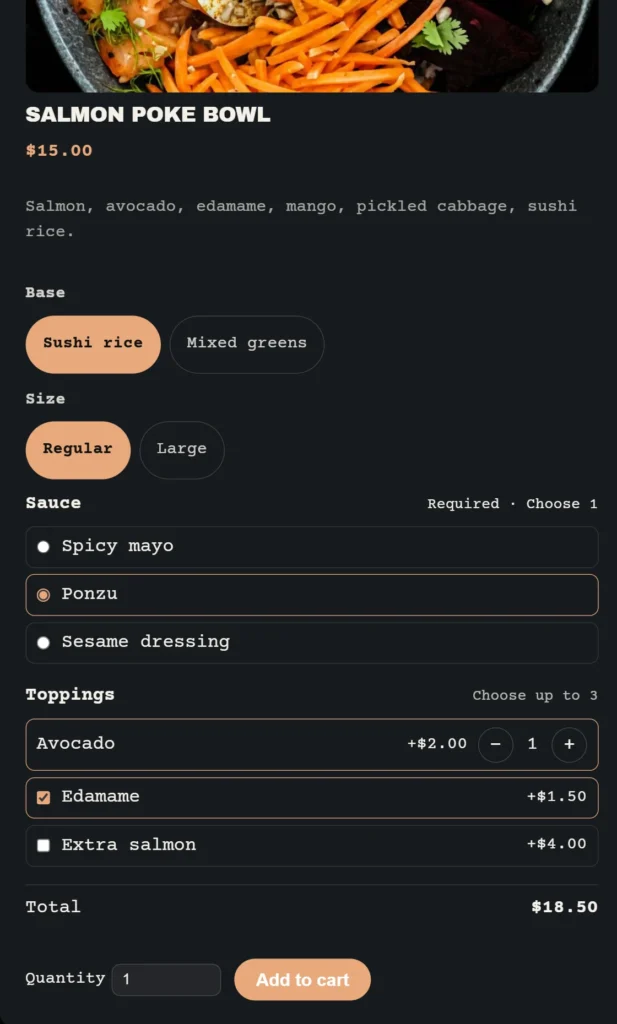
Food Online has its own product options. Guests pick a sauce, add toppings with an extra price, take an ingredient off, write a note for the kitchen or order a pizza half and half, right in the popup.
Make a choice required, set a minimum and a maximum, and give each choice an image and its own stock. The choices follow the order into the cart, the checkout, the order and the emails. Included in the free version too.
Let an AI assistant set up your menu
Turn on AI assistant access and connect Claude, Cursor, VS Code or another MCP client to your site. Then just ask: “Here is our menu as a PDF. Add the poke bowls, with a sauce to choose and toppings at extra cost.” The assistant builds the categories, dishes and option groups and shows you a preview before anything is saved.
It can also set opening hours, time slots and capacity, pickup locations and shipping, mark a choice as sold out, and copy a restaurant setup to another site. New dishes and menu pages start as drafts, it never sees customers or orders, and every change is logged in WooCommerce. It is off by default and needs WordPress 6.9 and the free MCP Adapter plugin.
What’s on the menu
For your guests
- A fast one-page menu that works on phones
- Delivery, pickup or eat-in, chosen first
- Address or postcode check before checkout
- A delivery or pickup time at checkout
- Sauces, toppings, sides and half and half on every dish
For the kitchen
- Preparation time, fixed or per dish
- Opening hours and schedules per category
- Several pickup locations, each with its own hours
- Minimum order value per delivery mode
- A friendly nudge for drinks and sides at checkout
- A setup guide that shows every change before it is saved
Plays well with
- WooCommerce shipping zones and methods
- Shipping Zones by Drawing
- Live Order Confirmation
- Shipday for delivery dispatch
- Product Add-Ons, YITH add-ons, the block editor and Elementor
From install to first order
Install
Download the zip from My account, upload it under Plugins in WordPress and activate it.
Add your dishes
Dishes are ordinary WooCommerce products. Group them in categories and the menu sorts itself. Add sauces, toppings and half and half under Products → Options (Food Online).
Open for orders
Put [foodonline] on any page, or build your own layout from blocks with the menu, delivery and cart shortcodes. Place a test order, then you are live.
Questions
Is there a free version?
Yes. Food Online for WooCommerce is free on WordPress.org. Premium is the full kit described on this page.
Can I draw my own delivery area?
Yes, together with Shipping Zones by Drawing. Draw the area on a map and Food Online checks the address against it.
Can I accept an order before we start cooking?
Yes, with Live Order Confirmation. The guest waits on the page while you accept or decline. There is a bundle with both.
Does it work with my theme?
Most likely. The menu goes on any page with a shortcode, or you build your own layout from blocks and shortcodes, and there is a fallback for themes that change the product loop. The docs have the details.
What does the licence include?
The plugin is yours to keep. The licence gives you a year of updates and support and renews yearly. If you stop renewing, the plugin keeps working, you just stop getting new updates and support. Pick the number of sites that fits you.